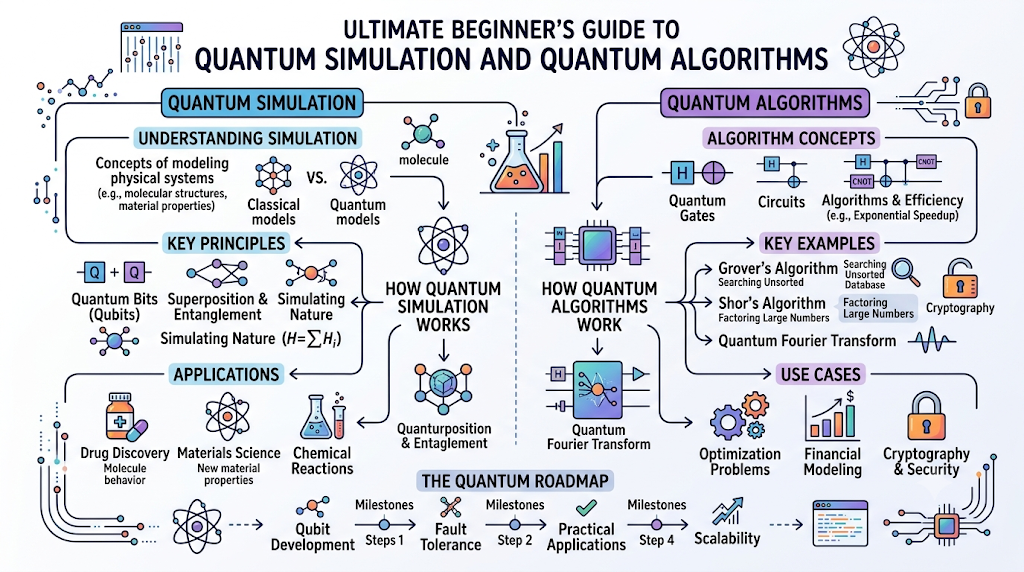
Introduction
Learning quantum computing can feel like trying to learn how to fly a commercial jet without ever stepping into a cockpit. Real quantum hardware is incredibly scarce, expensive, and delicate. This is where a quantum simulator becomes your most valuable learning tool. Quantum simulation acts as a critical bridge between abstract theory and practical experimentation. It allows students, software developers, and tech enthusiasts to write code, build quantum circuits, and test ideas directly on standard laptops or desktop computers. At QuantumUting.com, we believe that hands-on practice is the absolute best way to master complex technological fields. By replicating quantum behavior on classical machines, you can learn from your mistakes in a low-stakes environment. In this comprehensive, beginner-friendly guide, you will learn exactly how quantum simulations work, the core concepts powering them, the best platforms to use, and how to transition your skills smoothly from classical screens to real quantum hardware.
What Is Quantum Simulation?
A quantum simulation is the process of using a standard classical computer to mimic the mathematical behavior of a quantum computer. Instead of manipulating physical subatomic particles, regular software calculates exactly how those particles would behave under quantum conditions.
Featured Snippet Definition: A quantum simulator is a classical software program that mimics the behavior of a quantum computer. It allows users to write, test, and debug quantum algorithms by calculating quantum states using traditional bits, serving as an essential educational and developmental tool before running code on physical quantum hardware.
The primary purpose of quantum computing simulation is to validate your logic. Because real quantum systems are prone to environmental disruptions and errors, developers need a clean, predictable environment to ensure their code is structurally sound.
It is vital to understand the difference between simulation and real quantum hardware:
+-------------------------------------------------------------+
|                      CLASSICAL SIMULATION                   |
|  - Uses standard binary bits (0s and 1s) to compute math.   |
|  - Highly predictable, clean, and perfectly controlled.      |
+-------------------------------------------------------------+
                              vs
+-------------------------------------------------------------+
|                      REAL QUANTUM HARDWARE                  |
|  - Manipulates physical particles (atoms, photons, etc.).   |
|  - Vulnerable to environmental heat, noise, and errors.     |
+-------------------------------------------------------------+
While a simulator cannot match the ultimate speed of a massive, flawless quantum computer, it provides the perfect, noise-free sandbox for learning the ropes.
Core Concepts Behind Quantum Simulation
Before writing simulation code, you must grasp the foundational quantum computing concepts that these software programs replicate.
Qubits
A classical computer relies on bits, which act like basic light switches that are either off ($0$) or on ($1$). A quantum computer uses qubits (quantum bits). Think of a qubit like a spinning coin. While it spins, it is not just heads or tails; it contains properties of both possibilities at once.
Quantum States
A quantum state is the mathematical representation of a qubit’s status at any given millisecond. In a simulator, this state is tracked as a collection of probabilities, showing how likely a qubit is to land on a $0$ or a $1$ when checked.
Superposition
Superposition is the unique ability of a qubit to exist in a combination of multiple states simultaneously. Instead of choosing between $0$ or $1$, the qubit explores both options at the same time. This allows quantum algorithms to process vast amounts of data simultaneously.
Entanglement
Entanglement is a profound connection where two or more qubits become deeply linked. When qubits are entangled, the physical state of one instantly dictates the state of another, no matter how far apart they are. Simulators track these complex, web-like relationships mathematically.
Quantum Gates
In classical programming, you use logic gates (like AND, OR, NOT) to alter bits. In quantum programming, you use quantum gates to rotate, flip, and manipulate qubits while they are in superposition.
Quantum Circuits
A quantum circuit is the step-by-step blueprint of your algorithm. It is a visual and functional timeline showing exactly which quantum gates are applied to which qubits, leading up to a final measurement.
Beginner’s Guide to Quantum Simulation
Understanding how these simulations run on your ordinary computer makes the learning process feel far less intimidating.
How Quantum Simulators Work
Because your laptop runs on traditional binary code, it cannot physically perform superposition. Instead, it uses linear algebra matrices to calculate the exact probability of what would happen to a qubit. The simulator calculates the math step-by-step behind the scenes, mimicking the natural physics of quantum mechanics.
Building Simple Quantum Circuits
When you start, you will design simple layouts using visual tools or basic code frameworks. For instance, a typical beginner circuit involves taking one qubit, applying a specific gate to put it into superposition, and then observing the outcome.
Running Simulations
When you click “run,” the software executes your circuit hundreds or thousands of times in a row. These repeated attempts are often called “shots.” Because quantum computing is inherently probabilistic, running multiple shots ensures your data reflects an accurate spread of possibilities.
Understanding Simulation Results
Once the run finishes, the simulator displays a histogram chart. If you put a single qubit into a perfect fifty-fifty superposition, your final chart will show that it landed on $0$ roughly 50% of the time and on $1$ roughly 50% of the time.
Typical Simulation Histogram Result:
Probability (%)
100 |
 50 |   [█████████]      [█████████]
  0 +---------------------------------
            |0>              |1>
        (Zero State)     (One State)
Learning Through Practical Experiments
The best way to learn is by actively changing variables. By swapping out gates, adjusting qubit connections, or introducing artificial “noise” into your simulator, you can directly see how delicate quantum data behaves without needing access to multi-million-dollar laboratory gear.
QuantumUting.com Guide to Quantum Simulation
To build a reliable path forward, we recommend following a structured approach to learning quantum modeling.
Understanding Quantum Fundamentals
Do not rush straight into writing code. Spend time understanding the core language of quantum mechanics first. Learn what a vector state represents and why measuring a qubit forces it to lose its special quantum properties.
Practicing with Simulators
Make software simulators your primary home base. Spend your first few weeks building basic, two-qubit systems. Watch how the probabilities shift as you move pieces around the board.
Exploring Quantum Algorithms
Once comfortable with simple gates, look into historical quantum algorithms like the Deutsch-Jozsa or Grover’s Search algorithm. Recreate these famous frameworks on your local simulator to see how they achieve computational advantages.
Preparing for Quantum Hardware
As your simulations grow clean and error-free, begin introducing simulated environmental noise. This teaches you how real-world disturbances affect quantum code, effectively training you for real development deployments down the road.
Building Strong Quantum Computing Skills
Consistency overrides complexity. By building, testing, and debugging circuits weekly on a local machine, you will master the mental shift required for quantum logic far faster than by simply reading textbooks.
Popular Quantum Simulation Platforms
Several highly capable, free tools exist to help you practice quantum software engineering right now.
Qiskit Aer
Developed by IBM, Qiskit Aer is an incredibly popular element of the Qiskit framework. It provides high-performance simulators written in C++ that run seamlessly via Python. It is perfect for beginners because it integrates directly with educational tutorials and allows you to simulate realistic hardware errors.
Cirq Simulator
Created by Google, Cirq is tailored for developers working on NISQ (Noisy Intermediate-Scale Quantum) algorithms. Its built-in simulator is highly efficient for verifying circuit designs and exploring how specific quantum gates interact under tightly controlled conditions.
PennyLane
Developed by Xanadu, PennyLane is built specifically around quantum machine learning and differentiable quantum circuits. Its simulators are optimized to work alongside popular classical machine learning libraries like PyTorch and TensorFlow, making it ideal for data science enthusiasts.
QuTiP
The Quantum Toolbox in Python (QuTiP) is heavily favored by academic researchers. It focuses deeply on simulating the dynamics of open quantum systems, giving users fine-grained control over the physics involved.
Amazon Braket Local Simulator
Part of the AWS framework, this local simulator lets you run and debug your quantum circuits locally on your own machine using the Braket SDK before deploying them to the cloud.
Microsoft Quantum Development Kit
Utilizing the Q# programming language, this kit includes highly optimized simulators that integrate cleanly into standard development environments like Visual Studio, offering a robust platform for enterprise-minded developers.
Benefits of Quantum Simulation
Using simulated environments provides massive advantages that make quantum education accessible to everyone.
- Safe Learning Environment: There are no broken parts or costly mistakes here. If your code features a critical logic flaw, the simulator simply throws an error message rather than wasting valuable machine time.
- Lower Development Cost: Using local simulation tools costs absolutely nothing but your time, completely eliminating the hefty cloud computing fees associated with booking time on live quantum machines.
- Faster Experimentation: Real quantum computers require cooldown periods and long operational queues. Simulators give you instant feedback on your code modifications within seconds.
- Easier Debugging: Because simulators track everything via classical math, you can pause execution at any point to inspect the exact state of your qubits—something physically impossible to do on a real quantum machine without destroying the quantum data.
- Better Understanding of Quantum Concepts: Seeing probabilities transform visually on a graph turns abstract mathematical equations into concrete, understandable ideas.
- Accessible Quantum Education: It democratizes the landscape, allowing anyone with a basic internet connection or an ordinary laptop to participate in the quantum revolution.
Quantum Simulation vs Real Quantum Computers
While simulators are incredible tools, they have clear boundaries when compared to physical deployment targets.
| Feature | Quantum Simulation | Real Quantum Computers |
| Hardware Required | Standard classical computer | Advanced physical quantum hardware |
| Cost | Extremely low / Free | High operational and booking costs |
| Noise | Perfectly clean or custom configured | Natural, unavoidable hardware noise |
| Scalability | Limited heavily by classical RAM | Engineered for deep quantum scaling |
| Educational Value | Flawless for beginners and debugging | Best for final practical execution |
Common Challenges
Understanding the roadblocks you might encounter prevents discouragement when your simulations slow down.
Simulation Complexity & Classical Hardware Limitations
Every time you add a single qubit to a simulation, the classical memory needed to calculate its state doubles. A system with 30 qubits requires roughly 16 gigabytes of RAM to track. If you try to simulate 50 qubits, a standard laptop will completely run out of memory.
Recommendation: Keep your learning projects focused entirely on small-scale circuits (under 20 qubits) where standard hardware shines.
Performance Constraints
Because classical chips process tasks sequentially or via limited parallel cores, running deep circuits with hundreds of gates can cause your local computer to lag.
Recommendation: Optimize your code by removing unnecessary, repetitive gates and keeping your circuit designs highly streamlined.
Understanding Quantum Theory & The Learning Curve
Shifting your mind from linear classical logic to probabilistic quantum logic represents a steep hurdle.
Recommendation: Rely heavily on visual circuit builders and interactive step-by-step platforms to see the physical impact of your coding choices.
Best Practices
To maximize your time using quantum simulation software, implement these proven strategies:
- Learn quantum basics before advanced simulations: Build a solid conceptual foundation of superposition and gates before jumping into multi-layered coding frameworks.
- Start with small quantum circuits: Begin your testing with 1, 2, or 3 qubits to easily track every state change manually.
- Practice regularly using simulators: Writing even ten lines of code a day builds the necessary muscle memory for understanding quantum gates.
- Compare simulation outputs carefully: Run the exact same circuit through multiple distinct simulation configurations to observe how varied error profiles alter your final dataset.
- Build projects gradually: Start by mastering basic logic states, move up to recreating classic algorithms, and eventually design complex multi-qubit systems.
Career Opportunities
Developing a strong command of simulation practices opens doors across a rapidly expanding technological frontier.
- Quantum Software Developer: Designing the user-facing tools, libraries, and frameworks that allow global enterprises to interface with quantum processing units.
- Quantum Computing Engineer: Assisting in the design phase of quantum applications by prototyping structural models on classical hardware.
- Quantum Research Scientist: Exploring innovative applications of quantum mechanics in chemical analysis, materials science, and cryptography.
- Quantum Algorithm Developer: Creating optimized, highly efficient procedural pathways that solve incredibly complex logistics problems.
- Quantum Application Engineer: Acting as a practical liaison to help traditional tech businesses find ways to integrate quantum acceleration into their current corporate models.
- Quantum Systems Engineer: Analyzing how simulated environments can be scaled cleanly into physical cloud infrastructures.
Future of Quantum Simulation
The landscape of simulation is evolving rapidly, moving far beyond simple local scripts.
Hybrid Quantum-Classical Computing
The immediate future relies heavily on split workflows. Classical computers handle the base logic and initialization tasks, passing off specific, hyper-dense calculations to quantum processors before compiling the final answers on classical simulators.
AI-Assisted Quantum Simulation
Modern machine learning models are being deployed to predict quantum states efficiently, allowing classical computers to simulate slightly larger clusters of qubits without instantly hitting memory ceilings.
Cloud-Based Quantum Simulators
High-performance cloud datacenters now host massive classical clusters, allowing students and engineers to simulate systems far larger than their home laptops could ever support alone.
Common Misconceptions
Let’s clear up some frequent points of confusion that often throw off newcomers.
Quantum Simulators Are the Same as Quantum Computers
They are completely different systems. A simulator is a standard program running on classical silicon chips that merely calculates what a quantum computer should do through pure math equations.
Simulation Removes the Need for Real Hardware
Simulation is a foundational testing ground, but it cannot scale exponentially. Real quantum computers leverage actual atomic physics to solve incredibly massive problems that classical machines can never calculate, regardless of how optimized the simulation software is.
Larger Simulations Are Always Better
For educational purposes, a crisp 3-qubit simulation that you understand thoroughly is vastly more valuable than an intricate 25-qubit system that creates confusing, unreadable output data.
Beginners Must Learn Advanced Mathematics First
You do not need a degree in advanced particle physics or complex calculus to begin. If you understand basic fractions, percentages, and simple matrix multiplication, you can comfortably learn to run quantum simulations.
FAQ Section
1. Can I run quantum simulations on a standard home laptop?
Yes, standard laptops can easily simulate up to 20 qubits. Because educational projects use small circuits, your ordinary home setup is perfectly capable of running everyday simulation scripts.
2. Is quantum simulation software free to use?
The vast majority of top-tier simulation packages, including Qiskit Aer, Cirq, and PennyLane, are completely open-source and free for anyone to download and use.
3. Which programming language is best for quantum simulation?
Python is the absolute gold standard for quantum simulation. Almost every major framework features a deeply integrated, highly supported Python library.
4. Why do we need real quantum computers if we can simulate them?
Classical computers encounter a hard wall because simulating each added qubit doubles the required memory. For massive operations, a real quantum computer is required because it uses actual physical particles rather than computing raw probability matrices.
5. How long does it take a beginner to learn quantum simulation?
With consistent practice, a beginner can learn to build, run, and interpret basic quantum circuits on a simulator within a couple of weeks of steady study.
6. Can a quantum simulator mimic hardware errors?
Yes, advanced tools like Qiskit Aer allow you to design custom “noise models” that simulate real-world thermal relaxation and gate errors.
7. Do I need to understand quantum mechanics to use a simulator?
You only need to know the basic conceptual rules—like superposition and entanglement. You do not need deep expertise in quantum mechanics to write operational code.
8. What is the difference between a shot and a count in a simulation?
A shot represents a single execution run of your circuit, while a count is the accumulated sum of how many times the qubit landed on a specific final state across all shots.
9. Can I run my simulated circuits on real quantum hardware later?
Absolutely. Popular development frameworks are built so that the exact same code you run on your local simulator can be routed directly to real cloud-based quantum hardware.
10. How does a quantum circuit differ from a classical circuit?
A classical circuit uses physical logic gates to alter standard bits definitively, whereas a quantum circuit uses quantum gates to alter probability waves and manage superpositions of qubits.
Final Summary
Quantum simulation serves as the ultimate stepping stone for anyone eager to explore the next generation of computing. By providing a safe, zero-cost, and perfectly controlled learning space, simulators remove the historical barriers to entry surrounding quantum information science. They transform complex mathematical concepts into concrete visual graphs, giving you the practical tools necessary to master quantum circuits step-by-step. As you look to transition from reading articles to executing your own original code, remember that consistent experimentation is key. Use these free simulation platforms to build small projects, analyze your data, and gradually scale up your skills. For more comprehensive guides, structural deep-dives, and beginner resources, keep exploring QuantumUting.com as your go-to educational learning hub for your quantum journey.
