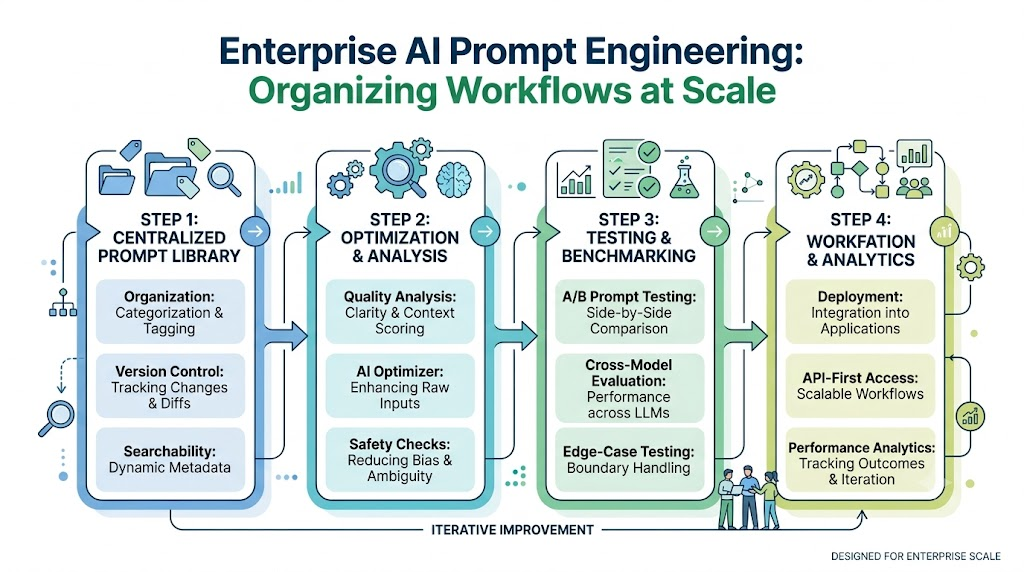
Generative AI has transformed how professionals write code, draft marketing copy, analyze research, and automate operations. However, most individuals and teams still treat AI instructions as disposable messages. Prompts are frequently pasted into chat windows, buried in sprawling spreadsheets, saved across disjointed note-taking applications, or lost completely in infinite chat histories. Relying on scattered prompts leads to inconsistent outputs, redundant drafting, and wasted operational hours. As artificial intelligence becomes central to enterprise workflows, treating prompts as temporary text is no longer sustainable. Organizations require structured AI prompt management software to transform isolated instructions into organized, version-controlled, and reusable digital assets.
What is an AI Prompt Management Tool?
An AI prompt management tool is a dedicated software platform designed to store, organize, refine, test, version, and deploy instructions used with large language models (LLMs). Rather than treating prompt creation as an ad-hoc task, a prompt management platform introduces software engineering rigor to the generative AI lifecycle.
[Raw Instruction] ➔ [Centralized Library] ➔ [AI Optimization & Analysis] ➔ [A/B Testing] ➔ [Versioned Production Asset]
Why Prompt Management Matters
When teams work without a centralized system, they face severe operational friction:
- Inconsistent Results: Different team members use varying prompt structures, leading to unpredictable quality across deliverables.
- Duplication of Effort: Employees constantly rewrite instructions that colleagues have already solved and refined elsewhere.
- Loss of Knowledge: Valuable prompt refinements disappear when chat sessions end or employees leave the company.
Benefits of Organized Prompt Libraries
Implementing a centralized AI prompt library transforms chaotic prompting habits into a scalable operational framework:
- Centralized Accessibility: Search and discover proven prompts instantly across department silos.
- Variable Standardization: Replace fixed inputs with dynamic parameters to adapt single prompts for multiple use cases.
- Continuous Improvement: Track performance refinements over time to ensure outputs improve consistently.
By using specialized platforms like Promptosia, creators and enterprises build durable prompt ecosystems that power consistent AI results.
Understanding Prompt Engineering
Prompt engineering is the strategic discipline of designing, structuring, and refining inputs to guide large language models toward generating accurate, high-quality, and contextually relevant outputs. Utilizing a modern prompt engineering platform helps users move past guesswork and establish reliable prompting frameworks.
                   ┌── 1. Role / System Persona
                   ├── 2. Core Instructions & Task
Prompt Structural  ├── 3. Context & Background Data
  Architecture     ├── 4. Dynamic Input Variables ({variable})
                   ├── 5. Output Format & Constraints
                   └── 6. Few-Shot Examples (Optional)
Essential Prompt Components
A well-architected prompt contains distinct, modular components designed to guide model reasoning:
- Role & Persona: Defines the AI’s perspective, expertise level, and voice (e.g., “Act as a Senior Cyber Security Auditor”).
- Context: Provides relevant background data, business rules, or environmental details necessary to inform the response.
- Instructions: Gives clear, step-by-step directives specifying what the model must perform.
- Variables: Placeholders (
{input_data},{target_audience}) that allow users to reuse the prompt with different data sets. - Output Formatting: Explicit constraints specifying the structural presentation (Markdown, JSON, tables, bullet points).
- Constraints: Rules defining boundaries and explicit non-goals (e.g., “Do not use technical jargon; limit response to 200 words”).
Leading AI providers, including the OpenAI Documentation and Anthropic Documentation, emphasize that structural clarity directly dictates model reliability.
Building an Organized AI Prompt Library
Without logical organization, saved prompts quickly become an unmanageable digital junk drawer. A true AI prompt organizer relies on structured taxonomy, tagging, and search mechanisms.
                   ┌── Categories (Marketing, Engineering, Legal)
                   ├── Tags (#Python, #SEO, #CustomerSupport)
Prompt Taxonomy ───┼── Variables ({client_name}, {code_snippet})
                   ├── Collections (Onboarding Kit, Code Review Suite)
                   └── Global Search (Indexed by Title & Function)
Key Elements of Prompt Organization
- Categorization: Group prompts by operational departments or functional disciplines (e.g., Engineering, Content Marketing, Legal, Customer Success).
- Tagging Systems: Apply granular tags (
#Refactoring,#GSTR1,#ColdEmail) to make prompts easy to filter across categories. - Dynamic Variables: Replace static values with flexible parameter inputs, allowing one master prompt to handle hundreds of variations.
- Prompt Collections: Group related prompts into sequential execution chains, such as a multi-step content publishing or code-review pipeline.
By standardizing organization, teams cut down search time and ensure verified instructions remain readily accessible. Explore how structured categories work using the Promptosia Prompt Library.
AI Prompt Optimization
A rough draft of an instruction rarely yields production-grade output. An AI prompt optimizer enhances raw prompts by improving structural clarity, adding necessary context, and defining explicit output parameters.
Before and After Optimization
Unoptimized Prompt (Basic)
“Write a blog post about email marketing for small businesses.”
Optimized Prompt (Structured Engine)
Role: You are a B2B SaaS Content Marketing Specialist.
Task: Write an informative 800-word blog post on email marketing strategies tailored for small retail businesses.
Context: Small business owners have limited time and budget; they need low-cost, high-yield automation strategies.
Variables: Target Niche:
{business_type}, Key Metric:{primary_goal}.Format: Use clear H2/H3 headings, bullet points for readability, and include a call-to-action.
Constraints: Active voice only. Avoid generic fluff and buzzwords.
Systematically refining prompts using platforms like the Promptosia Optimizer removes ambiguity and delivers consistent, high-performing outputs.
AI Prompt Analysis
Before deploying an instruction to automated workflows or sharing it with team members, analyzing its structural components is essential. An AI prompt analyzer breaks down a prompt to ensure no critical instructions or context are missing.
[Raw Prompt Submission]
          │
          ▼
┌───────────────────────────────────┐
│     Prompt Analyzer Engine        │
├───────────────────────────────────┤
│ 1. Primary Goal Identification    │
│ 2. Context & Persona Evaluation   │
│ 3. Variable Detection ({inputs})  │
│ 4. Safety & Risk Classification   │
└───────────────────────────────────┘
          │
          ▼
[Structured Prompt DNA Breakdown]
According to technical research frameworks listed on Google AI Documentation and Hugging Face Documentation, evaluating prompt structure prior to execution reduces edge-case failures and unexpected model drift.
Using tools like the Promptosia Analyzer, users receive a detailed structural breakdown (Prompt DNA) that identifies the primary objective, variable inputs, and output constraints before running a query.
Prompt Quality Checking
A dedicated prompt quality checker scores instructions across essential dimensions, giving users a objective benchmark for improvement.
                               ┌── Clarity Score
                               ├── Context Completeness
 Prompt Quality Metrics Index  ├── Structural Formatting
                               ├── Reusability Index
                               └── Safety & Risk Boundaries
Key Scoring Dimensions
- Clarity: Measures how unambiguous the instructions are for the language model.
- Context: Evaluates whether adequate background information is provided to guide reasoning.
- Structure & Formatting: Assesses whether the requested output format is explicitly defined.
- Reusability: Determines if variables are properly parameterized for repetitive use.
- Safety & Compliance: Flags potential policy violations, prompt injection vulnerabilities, or unintended bias.
Automated quality scoring helps users identify exact design weaknesses—such as missing output formats or missing variables—rather than relying on trial and error.
Version Control for AI Prompts
When you refine a prompt to adjust its tone, formatting, or target output, you risk breaking parameters that previously worked well. Utilizing a specialized prompt version control tool brings software development practices to prompt engineering.
v1.0 (Initial Draft) ──► v1.1 (Added JSON Output) ──► v2.0 (Parameterized Variables) [Active]
                                 │
                                 └── (Rollback Branch Available)
Why Version History Matters
- Change Tracking: View complete diff logs showing exactly what text, variables, or system instructions were modified.
- Instant Rollbacks: Restore a previous, stable version instantly if a recent prompt iteration degrades output quality.
- Experimentation Protection: Test bold refinements without losing your baseline production prompts.
- Audit Trails: Maintain clear records of who modified instructions across enterprise team workflows.
Testing AI Prompts
Language models evolve continuously, and different model families (e.g., GPT-4o, Claude 3.5 Sonnet, Gemini 1.5 Pro) process instructions differently. An AI prompt testing tool lets users execute A/B comparisons to evaluate output quality across models and variations.
                     ┌── Model A (GPT-4o)      ──► Output Benchmark A
[Test Input Params] ─┼── Model B (Claude 3.5)  ──► Output Benchmark B
                     └── Model C (Gemini Pro)  ──► Output Benchmark C
Testing Methodologies
- A/B Testing: Run two prompt variations against identical input variables to determine which version produces cleaner results.
- Cross-Model Benchmarking: Evaluate how a single prompt performs across different AI engines to choose the most cost-effective model.
- Edge-Case Validation: Test extreme, unexpected, or malformed inputs to ensure your prompt handles exceptions gracefully.
Reusable AI Prompt Templates
Creating reusable AI prompt templates turns one-off queries into reliable, repeatable assets across everyday business operations.
  ┌────────────────────────────────────────────────────────┐
  │              Reusable Template Architecture            │
  ├───────────────┬─────────────────┬──────────────────────┤
  │ Domain        │ Fixed Framework │ Dynamic Variables    │
  ├───────────────┼─────────────────┼──────────────────────┤
  │ Writing       │ Outline Engine  │ {topic}, {tone}      │
  │ Engineering   │ Code Reviewer   │ {language}, {code}   │
  │ Marketing     │ Campaign Copy   │ {product}, {audience}│
  │ Support       │ Escalation Sync │ {issue}, {tier}      │
  └───────────────┴─────────────────┴──────────────────────┘
Core Template Use Cases
- Writing & Editorial: Generate structured article outlines, copy editing passes, and meta descriptions using parameterized tags.
- Software Engineering: Automate unit test generation, code reviews, and API documentation drafting.
- Marketing & Sales: Create targeted ad copy variations, cold email sequences, and social media frameworks.
- Customer Support: Standardize response templates for complex troubleshooting scenarios while maintaining brand tone.
- Research & Analysis: Summarize long whitepapers, extract tabular data, and surface key metrics consistently.
Promptosia for Different User Types
Different professionals require tailored prompt management workflows to maximize productivity.
Writers
Organize creative frameworks, maintain consistent stylistic tone, and generate structured content outlines without starting from scratch.
Developers
Store code generation templates, maintain strict refactoring rules, and generate system documentation using standardized variables.
Marketers
Manage campaign messaging, organize multi-channel copy frameworks, and run A/B variations across target demographics.
Students
Structure complex study guides, generate custom practice quizzes, and break down dense academic papers step by step.
Researchers
Standardize data extraction formats, synthesize multi-document literature reviews, and maintain clear methodology prompts.
Educators
Build reusable lesson planning templates, create rubric evaluation tools, and draft personalized feedback frameworks.
Businesses
Enforce brand alignment, build secure team prompt repositories, and streamline customer communication workflows.
Content Creators
Manage multi-platform repurposing scripts, streamline video concept generation, and track top-performing creative prompts.
Agencies
Maintain client-specific prompt libraries, secure proprietary workflows, and ensure team-wide production consistency.
AI Professionals
Benchmark model responses, track prompt version control metrics, and build advanced system-level prompt chains.
Best Practices for Prompt Management
- Save Successful Instructions Immediately: Move high-performing prompts out of ephemeral chat sessions and into a central repository right away.
- Standardize Variable Naming: Use clear variable formats like
{variable_name}across all templates. - Categorize and Tag Consistently: Establish strict category hierarchies and tag conventions across your team.
- Maintain Version Histories: Always document why a prompt was updated to preserve context for future iterations.
- Test Before Production: Run new prompt variations against sample variables before deploying them across critical team workflows.
Common Prompt Engineering Mistakes
- Vague Directives: Giving open-ended commands without specifying key details leads to generic, low-quality outputs.
- Missing Output Formatting: Failing to specify structural preferences (such as tables, JSON, or lists) forces you to clean up responses manually.
- Hardcoded Input Values: Embedding specific details directly into prompt text limits reusability and creates extra maintenance.
- Ignoring Version Control: Editing live prompts without tracking changes makes it hard to diagnose sudden drops in output quality.
- Skipping Quality Analysis: Deploying unverified prompts leads to unexpected edge-case errors across user workflows.
Comparison Table: Manual Storage vs. Dedicated Management
| Feature / Metric | Manual Prompt Storage (Notes/Spreadsheets) | Promptosia Platform |
| Organization | Fragmented, hard to search, unindexed | Centralized, categorized, tagged collections |
| Version Control | Manual copying, no diff tracking | Automated version history and rollback logs |
| Searchability | Basic keyword searching, slow discovery | Instant, full-text indexed variable search |
| Testing Capability | Manual copy-pasting across models | Side-by-side model benchmarking |
| Quality Analysis | Subjective trial-and-error evaluation | Automated structural scoring & Prompt DNA |
| Team Collaboration | Static document sharing, version drift | Shared team libraries, passports, and roles |
The Future of Prompt Engineering
The generative AI landscape is evolving from simple chat interfaces toward automated, programmatic AI workflows.
[Chat Interface] ──► [Structured Prompt Management] ──► [Autonomous Agent Workflows]
According to enterprise trends documented on Microsoft Learn AI and W3C Standards, key developments shaping the future of prompt engineering include:
- AI-Assisted Optimization: Automated background systems that continuously analyze and refine system prompts based on real-time execution metrics.
- Prompt Standardization: Open metadata specifications that allow prompts to run reliably across different LLM architectures.
- Shared Enterprise Repositories: Secure, version-controlled prompt libraries that serve as central operational assets for enterprise AI agents.
How Promptosia Helps Users Build Better Prompts
Promptosia is designed to turn chaotic prompt collections into organized, high-performing AI workflows.
                     ┌── Centralized Prompt Library
                     ├── AI-Powered Optimization Engine
                     ├── Prompt DNA Analysis & Quality Scoring
  Promptosia System  ├── Automated Version Control Logs
    Capabilities     ├── Side-by-Side Prompt Testing
                     ├── Public Prompt Passports
                     └── Interactive Prompt Duels
- Centralized Library Hub: Store, tag, and organize all your prompts in a searchable repository.
- Prompt DNA Analysis: Analyze prompt goals, variable structures, risk levels, and output expectations instantly.
- Automated Quality Scoring: Receive actionable feedback across clarity, context, reusability, and safety dimensions.
- Prompt Passports & Sharing: Publish verified prompts with public credentials or share secure assets across team workspaces.
- Prompt Duels: Benchmark prompt performance through community evaluations to identify top-performing variations.
Learn more about the platform’s vision on the Promptosia About Page.
Frequently Asked Questions
1. How does an AI prompt organizer improve workflow productivity for creative and technical teams?
An AI prompt organizer structures scattered text files, chat histories, and notes into a single searchable repository. By categorizing prompts using custom tags, model filters, and clear folder hierarchies, team members can find verified instructions in seconds. This eliminates redundant prompt drafting, keeps brand messaging consistent across departments, and ensures that high-performing prompts remain accessible to the entire organization instead of being trapped in personal chat histories.
2. What is the difference between a static prompt and a dynamic reusable prompt template?
A static prompt contains fixed, hardcoded text designed for a single, specific task, requiring manual editing every time details change. In contrast, a dynamic reusable prompt template uses standardized variable placeholders (such as {{user_persona}} or {{code_block}}). This structure allows a single master prompt to process varied inputs seamlessly without altering the core instructions, system role, or output constraints.
3. How does prompt quality scoring help prevent large language model hallucinations?
Prompt quality scoring evaluates instructions against key structural criteria, such as role definition, background context, step-by-step logic directives, and explicit negative constraints. By flagging vague language or missing boundaries before deployment, a quality checker forces creators to set clear guardrails (e.g., “Only use facts provided in the context”). This drastically reduces the likelihood of the model making assumptions or generating unverified information.
4. Why is side-by-side prompt testing essential when migrating between different AI models?
Different model architectures (such as GPT-4o, Claude 3.5 Sonnet, or Gemini 1.5 Pro) interpret system instructions, formatting rules, and nuances differently. Running side-by-side prompt tests allows developers and creators to compare outputs across multiple models simultaneously using the same test dataset. This highlights variations in accuracy, tone, and formatting compliance, ensuring your prompt instructions perform reliably before switching models in production.
5. How do Prompt Passports help verify and certify prompt assets for enterprise use?
Prompt Passports act as digital certificates that verify a prompt’s quality, security compliance, and performance history. They confirm that a prompt asset has undergone thorough structural analysis, token optimization, safety checks, and multi-model testing. For enterprises and agencies, this guarantees that third-party or internal prompt assets meet strict operational standards before being integrated into production pipelines.
6. Can prompt version control track token usage and cost efficiency across different iterations?
Yes. Advanced prompt version control logs structural changes alongside performance metadata, such as token count and processing efficiency. By comparing version history, users can see if adding extra context or examples improved response quality enough to justify the higher token cost, helping teams strike the right balance between output depth and API expenditure.
7. How do prompt duels work, and how do they refine prompt engineering techniques?
Prompt duels pitch two different prompt structures against one another in a head-to-head evaluation environment using identical test inputs. Evaluators or automated scoring scripts analyze the outputs to determine which prompt variant delivers better accuracy, formatting, or tone. This comparative feedback helps prompt engineers identify which specific phrasing techniques yield the best results for complex tasks.
8. What role do negative constraints play in optimizing AI prompt performance?
Negative constraints define explicit boundaries by telling the AI model what not to do (for example, “Do not use passive voice,” “Do not include conversational filler,” or “Do not generate code outside of TypeScript”). Including clear negative constraints prevents common model tendencies, reduces token waste, and keeps outputs tightly aligned with project requirements.
9. How does centralized prompt management prevent knowledge loss during team turnover?
In unmanaged environments, an employee’s best prompts usually vanish when they leave the company or delete their local notes. A centralized prompt management platform archives all created, tested, and optimized prompts within shared workspace libraries. This secures institutional knowledge as persistent digital assets, ensuring new hires can immediately access and execute proven prompt workflows.
10. How do dynamic variables integrate with external API parameters in AI workflows?
Dynamic variables within prompt management tools act as standardized API placeholders. When an application triggers an AI workflow, backend services map database fields or user inputs directly into bracketed variables like {{customer_query}} or {{order_id}}. This feeds cleanly populated prompts into the model API, enabling automated, context-aware responses at scale.
Conclusion
Mastering generative AI requires more than drafting quick, one-off chat messages. As artificial intelligence becomes an integral part of modern business operations, organizations must adopt reliable AI prompt management software to bring structure, quality control, and reusability to their AI workflows. By implementing systematic prompt engineering, AI-assisted optimization, automated quality scoring, and version control, individual creators and enterprise teams can turn scattered text files into organized, high-value prompt libraries. Moving away from trial-and-error prompting reduces manual work, improves output consistency, and saves valuable operational time.
