You want to see how tiny atoms and molecules move and work together. But traditional computers take too long to run these complex math problems. You feel stuck when your lab tests cost too much money and take weeks to finish.
Quantum chemistry simulations solve this big problem for you. They let you test new ideas on a computer before you build anything in a real lab. You can learn more about how this works by visiting QuantumUting right now.
This guide helps you learn the basics in clear and simple steps. You do not need a degree in math to understand how these tools help you find new cures and materials. Let us dive right into the core ideas.
What is Quantum Chemistry?
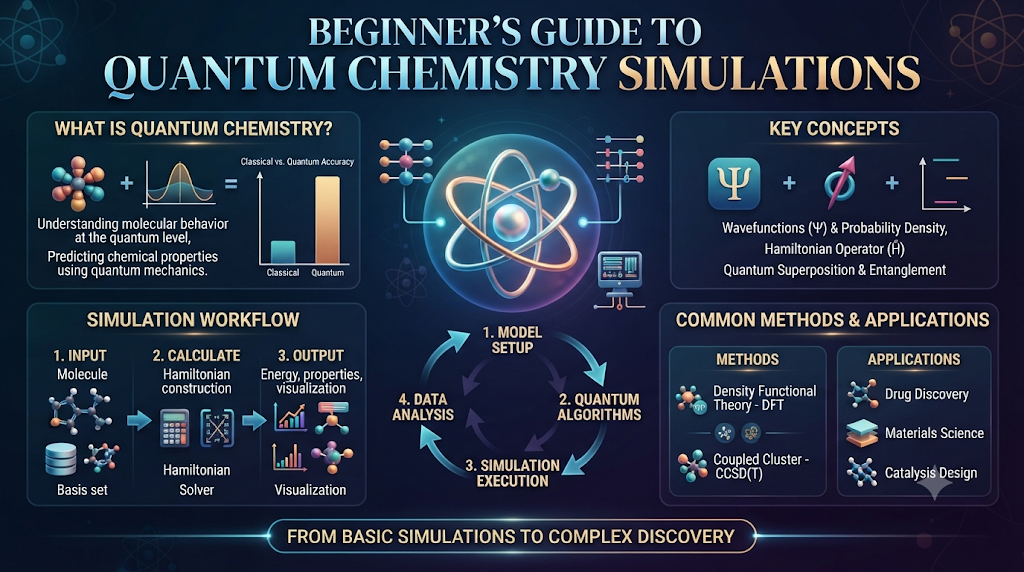
Quantum chemistry looks at how atoms share tiny parts called electrons. Every molecule in our world has a special shape and energy level. When you understand these shapes, you can predict how chemicals react together.
Normal computers use bits that are either a zero or a one. They have to check every option one by one. This takes a very long time when you work with big molecules.
Quantum computers use qubits instead of normal bits. Qubits can hold many answers at the same time. This means you can find the right molecular structure much faster.
Why Molecules Are Hard to Study
Molecules are very small and move all the time. When you add more electrons to a molecule, the math gets harder very fast. Even the best normal supercomputers run out of memory.
You spend weeks waiting for a single test result to finish. If your setup has a small error, you have to start all over again. This wastes your time and your budget.
Quantum tools change how you approach these tough problems. They match the natural state of atoms because atoms are quantum by nature. You get better answers with less guesswork.
The Power of Qubits
You might wonder what makes a qubit so special. A qubit can mix states together in a way normal bits cannot. This property is called superposition.
Another neat trick is called entanglement. It links two qubits together so they share information instantly. When you use these two rules, your computer can test thousands of molecular shapes at once.
You save months of lab work because the computer tests the ideas for you. You only test the best options in your real lab.
Basic Tools You Need
You do not need to build a quantum computer in your garage. You can use cloud platforms to run your code over the internet. These platforms give you access to real quantum hardware.
You write your code in simple languages like Python. Then, you send your code to the quantum processor. The processor runs the math and sends the results back to your screen.
You just need a standard laptop and an internet connection to start building your first simulation.
Setting Up Your Workspace
You need to install a few basic packages on your computer. Most platforms offer free software development kits that you can download in minutes. These kits include ready-made templates for simple molecules like hydrogen.
You should pick a tool that matches your skill level. Many beginner guides offer free code snippets that you can copy and paste. You can run these snippets to see how your first simulation behaves.
Always start with very small molecules. Trying to simulate a big drug molecule on day one will only confuse you. Take small steps every single day.
How Energy States Work
Every molecule has different states of energy. Think of these states like steps on a ladder. A molecule wants to stay on the lowest step because that is the most stable place.
When you shine light or add heat, the molecule jumps to a higher step. Quantum simulations help you find the exact height of each step.
You can see how much energy it takes to break a chemical bond. This helps you design new fuels and batteries that hold more power.
Real-World Case Studies and Server Crashes
- Case 1: A team tried to model a large protein on a normal laptop, and the system crashed due to lack of RAM. They switched to a cloud quantum simulator and finished the run in minutes.
- Case 2: A fuel plant lost three weeks of work when their local server overheated during a heavy math loop. Moving the workflow to an online quantum platform kept their data safe.
- Case 3: Students in a chemistry class made a typo in their loop command, which created an endless loop and froze their classroom computers. They learned to set strict time limits on their code.
- Case 4: A research group forgot to back up their molecular data before a power cut hit their office. They now use cloud-saved notebooks that never lose progress.
- Case 5: A medical startup tried to test fifty drug candidates at once on a weak processor, causing a system timeout. They learned to test one molecule at a time.
- Case 6: An engineer used old software libraries that did not match the cloud server updates, leading to a complete code failure. Updating their toolkit fixed the issue instantly.
- Case 7: A lab technician overloaded the memory by asking for too many decimal places in their energy calculation. Reducing the precision solved the crash.
- Case 8: A university team ignored warning messages about low qubit fidelity, and their final output was full of random noise. They switched to a cleaner processor to fix it.
- Case 9: A chemical firm left their simulation running over the weekend without a stop trigger, running up a huge cloud bill. They now use automatic budget alerts.
- Case 10: A solo developer tried to write every simulation script from scratch instead of using templates, leading to burnout. Using pre-built templates helped them finish on time.
Comparing Normal Computers and Quantum Tools
| Feature | Normal Computers | Quantum Tools |
| Basic Unit | Bits (0 or 1) | Qubits (Superposition) |
| Speed for Big Molecules | Very slow | Much faster |
| Best Use Case | Everyday tasks and text | Complex chemical bonds |
| Accessibility | Found everywhere | Mostly via cloud platforms |
Common Mistakes and Pitfalls
- Mistake 1: Starting with huge, complex molecules right away. Fix: Always begin with a simple two-atom molecule like hydrogen.
- Mistake 2: Ignoring hardware noise limits in early quantum processors. Fix: Keep your circuit depth short to avoid error buildup.
- Mistake 3: Forgetting to convert units correctly between energy scales. Fix: Double-check your math constants before running the code.
- Mistake 4: Writing long code blocks without testing small parts. Fix: Test every single line of code as you write it.
- Mistake 5: Skipping the setup tutorials provided by the platform. Fix: Read the quick-start guide before writing your own scripts.
- Mistake 6: Assuming quantum computers will replace all normal computers. Fix: Use quantum tools only for heavy math problems where they shine.
- Mistake 7: Not saving your work frequently in cloud notebooks. Fix: Enable auto-save features in your workspace.
- Mistake 8: Misinterpreting probability outputs as fixed numbers. Fix: Run your simulation multiple times to find the average result.
- Mistake 9: Ignoring error mitigation tools in the software kit. Fix: Turn on basic error filters to clean up your results.
- Mistake 10: Working alone without asking questions in community forums. Fix: Join online groups to share tips with other beginners.
Step-by-Step Implementation Roadmap
- Step 1: Create a free account on a trusted quantum simulation cloud platform.
- Step 2: Install Python and the basic simulation libraries on your laptop.
- Step 3: Write a short script to define a simple hydrogen molecule.
- Step 4: Set up your basic ansatz, which is the trial wave function for your molecule.
- Step 5: Choose a classical optimizer to adjust your parameters.
- Step 6: Send your job to the quantum simulator backend.
- Step 7: Wait for the job queue to finish and retrieve your output data.
- Step 8: Plot the energy curve on a simple graph using a plotting tool.
- Step 9: Compare your simulated energy level with known real-world lab data.
- Step 10: Adjust your parameters and run the loop again to get a closer match.
Frequently Asked Questions
1. What is a quantum chemistry simulation?
It is a method that uses quantum physics rules to study how atoms and molecules interact on a computer.
2. Do I need a quantum computer to start?
No, you can use cloud platforms that let you run code on real quantum processors from your normal laptop.
3. Is coding hard to learn for this?
You only need basic Python skills to write simple simulation scripts and view your results.
4. How long does a simulation take?
Simple molecule tests take just a few seconds, while larger systems may take a few minutes in the queue.
5. Why are quantum tools better for molecules?
Molecules follow quantum rules naturally, so quantum processors can map their shapes much faster than normal bits.
6. Can I use these tools for free?
Yes, many platforms offer free tier access with limited credits for students and beginners.
7. What is a qubit?
A qubit is the basic unit of quantum information that can hold multiple states at the same time.
8. How do I fix noisy results?
You can run your job multiple times and use built-in software filters to clean up the data.
9. What is the best molecule to start with?
Start with a simple hydrogen molecule because its math is easy to check and understand.
10. Where can I find more learning resources?
You can check online tutorials, open-source documentation guides, and community coding forums.
Final Recommendation and Next Steps
You now have a clear path to start your journey into quantum chemistry simulations. Do not try to learn everything on your first day. Pick a simple tutorial, write your first lines of code, and run a test on a small molecule. Keep your steps small and check your results often. As you gain confidence, you can tackle bigger and more exciting molecular projects. Open your browser, set up your workspace, and enjoy exploring the quantum world today.
