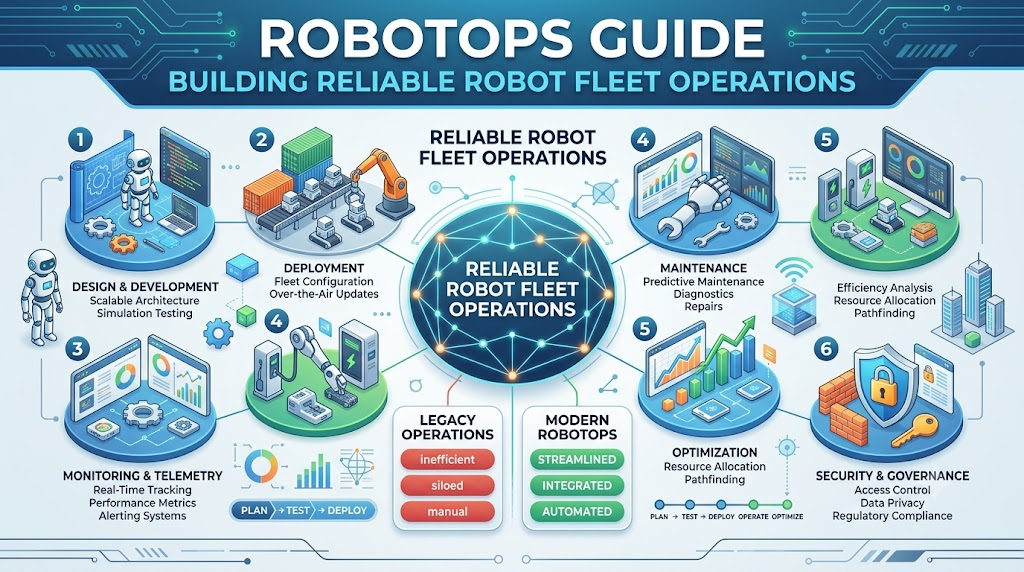
A robot completing a task successfully is only one part of a robotics project. The bigger challenge begins when that robot must work every day, operate alongside other machines, handle changing conditions, and receive regular software updates. A single failure can interrupt an entire workflow when robots are connected to manufacturing, logistics, healthcare, or warehouse operations. This is where RobotOps becomes useful. RobotOps brings software operations, automation, monitoring, maintenance, and robotics engineering together to support robots throughout their working life. It helps teams move beyond building robots and focus on operating them consistently in real environments. Robot Fleet Management is an important part of this approach. It allows teams to monitor, coordinate, update, and maintain multiple robots through connected systems and processes. This article explores RobotOps from an operational perspective, showing how organizations can manage robotic systems after development and prepare them for long-term use.
RobotOps Explained Through the Operational Lifecycle
RobotOps can be understood by looking at everything that happens to a robot from its first development stage to its eventual retirement.
During development, engineers write software, test sensors, and validate movement. After deployment, the robot faces real-world conditions that may not have appeared in the laboratory. Its battery may weaken, the environment may change, connectivity may drop, or a software component may stop responding.
RobotOps creates a continuous process for handling these situations.
It includes activities such as:
- Deploying robotics software
- Monitoring robot health
- Managing configuration changes
- Tracking fleet performance
- Investigating failures
- Planning maintenance
- Improving safety procedures
- Automating repetitive operational tasks
For example, developing a robot is similar to building a vehicle. Manufacturing the vehicle is not enough. It also needs inspections, servicing, software updates, fuel management, and safety procedures. RobotOps provides a similar support structure for robotic systems.
RobotOps in Simple Terms
RobotOps is a method for operating and maintaining robots through monitoring, automation, software management, and reliability practices.
It helps organizations manage both individual robots and complete fleets after deployment.
Why Deploying a Robot Is Not the Final Step
Many robotics projects place significant attention on the development and demonstration stages. A robot may successfully follow a route or move an object during a controlled test. However, production environments introduce new variables.
A warehouse robot may encounter blocked pathways. An industrial robot may experience changes in workload. An outdoor robot may face rain, dust, uneven surfaces, or unreliable network coverage.
These conditions create operational challenges.
Frequent Problems in Robotic Environments
Unexpected failures: Motors, batteries, sensors, communication modules, or software services can fail during operation.
Software inconsistency: Robots in the same fleet may run different software versions or configurations, making troubleshooting more difficult.
Manual intervention: Operators may need to inspect robots individually when there is no centralized monitoring system.
Safety-related interruptions: A robot may need to stop when it detects an obstacle, loses localization, or experiences a sensor problem.
Slow troubleshooting: Engineers may lose valuable time traveling to the robot’s location or collecting information manually.
Poor visibility: Without reliable logs and telemetry, teams may know that a robot stopped but not understand the reason.
RobotOps addresses these issues by creating repeatable operational processes. Instead of responding to every problem from scratch, teams use defined monitoring rules, escalation procedures, and recovery methods.
The Role of Robot Fleet Management
Managing one robot and managing a large fleet are different responsibilities. One robot can sometimes be monitored manually. A fleet needs coordinated systems that provide visibility across all machines.
Robot Fleet Management involves supervising and coordinating multiple robots through a centralized or connected management platform.
A fleet management system may help teams understand:
- Which robots are active
- Which robots are charging
- Which tasks are in progress
- Which machines require maintenance
- Where failures are occurring
- Which software version each robot uses
- How resources are distributed
Centralized Control and Visibility
Suppose a facility operates 75 autonomous mobile robots. Without a fleet management system, an operator may need to check several interfaces to understand robot status.
With a centralized system, the operator can view the fleet through a common dashboard. This makes it easier to identify unavailable robots, delayed tasks, charging conflicts, and repeated errors.
Centralized visibility does not mean every decision should be automated. Certain actions, particularly those involving safety, may require human approval or carefully defined safeguards.
Task Assignment
Fleet management systems can help allocate work based on factors such as:
- Robot location
- Battery condition
- Current workload
- Available equipment
- Task priority
- Robot capabilities
For example, assigning a long-distance task to a robot with a critically low battery may increase the chance of interruption. A fleet system can use operational information to support better task allocation.
Coordinated Updates
When several robots use the same software, updating them individually can lead to inconsistent configurations. Fleet management supports controlled deployment processes, including staged releases and version tracking.
Important Building Blocks of RobotOps
RobotOps is not a single product. It is a combination of processes, technologies, and team responsibilities.
1. Telemetry Collection
Telemetry means collecting information about a system’s condition and activity.
In robotics, telemetry can include:
- Battery level
- Motor temperature
- Robot location
- CPU usage
- Sensor status
- Network quality
- Task progress
- Error codes
Telemetry gives operators information about what is happening inside a robot.
Consider a robot that frequently stops during long shifts. Battery telemetry may show that the battery level drops faster than expected. This information can guide further investigation into battery age, workload, charging behavior, or environmental conditions.
2. Logging and Observability
Logs record events and messages generated by software. Observability is the ability to understand a system’s internal behavior by examining information such as logs, metrics, and traces.
A robotics observability system may help engineers connect several events:
- The robot loses localization.
- Navigation retries increase.
- CPU usage rises.
- The robot stops completing tasks.
Looking at these signals together can provide more context than a single error message.
Monitoring may tell an operator that a robot is offline. Observability can help engineers investigate whether the problem began with a network interruption, software crash, or hardware issue.
3. Robot Lifecycle Management
Robot lifecycle management covers the complete operational journey of a robotic system.
The lifecycle may include:
- Planning
- Design
- Development
- Simulation
- Hardware testing
- Deployment
- Monitoring
- Maintenance
- Upgrades
- Retirement
Each stage requires different controls. Experimental software may be suitable for a laboratory robot but inappropriate for a production fleet without additional testing and approval.
4. Predictive Maintenance
Predictive maintenance uses equipment data to identify possible signs of failure before a major breakdown occurs.
For robots, teams may review:
- Battery degradation
- Motor temperature
- Vibration patterns
- Sensor warnings
- Charging behavior
- Repeated error events
Predictive maintenance is not a guaranteed method of preventing failures. Its usefulness depends on reliable data, appropriate analysis, and effective maintenance procedures.
5. Incident Management
An incident occurs when a robot or robotics service experiences an interruption, failure, or significant reduction in performance.
A well-defined incident process should identify:
- How the problem is detected
- Who receives the alert
- How the issue is prioritized
- What immediate actions are allowed
- When the robot must be isolated
- How the cause is investigated
- How the incident is documented
For example, a temporary reporting delay and a malfunctioning safety sensor should not necessarily receive the same response. Incident priorities should reflect operational impact and safety requirements.
Who Needs RobotOps Skills?
RobotOps involves several professional roles. Responsibilities may differ between organizations, but collaboration is essential.
Robotics Developers
Robotics developers create and maintain software for movement, control, perception, navigation, and robot interaction. Operational data helps them identify issues that appear only in real environments.
DevOps Engineers
DevOps engineers can support version control, automated testing, deployment pipelines, configuration management, and infrastructure integration.
SRE Professionals
Site Reliability Engineers can apply reliability principles to robotics platforms, including monitoring, incident response, service objectives, and post-incident reviews.
Automation Engineers
Automation engineers connect robots with warehouse management systems, industrial platforms, enterprise applications, and production workflows.
Fleet Operators
Fleet operators monitor active robots, respond to alerts, manage task interruptions, and coordinate daily operations.
Maintenance Teams
Maintenance professionals use operational records to plan inspections, repair equipment, and track recurring hardware problems.
RobotOps works best when these teams share information rather than treating software, hardware, and operations as completely separate areas.
Technical Skills to Develop
A learner does not need to master every robotics technology immediately. A gradual learning plan is more practical.
ROS 2 Fundamentals
ROS 2 is a robotics framework that supports communication between software components.
Important topics include:
- Nodes
- Topics
- Services
- Actions
- Parameters
- Launch files
- Packages
- Communication quality settings
ROS 2 knowledge is particularly helpful when working with robotics platforms built around ROS-based components.
Linux and Networking
Robotic systems often use Linux-based environments. Basic knowledge of processes, permissions, networking, and system logs helps with troubleshooting.
Learners should understand:
- IP addresses
- Network connectivity
- Ports
- Service processes
- Shell commands
- File permissions
- System resource usage
Robotics Middleware
Middleware is the software layer that allows different components to communicate.
A robot may use middleware to transfer information between cameras, navigation services, controllers, and monitoring applications. Understanding message flow and communication failures can help engineers diagnose complex issues.
Simulation and Navigation
Simulation skills help learners test robot behavior before using physical hardware. Basic navigation knowledge includes mapping, localization, path planning, and obstacle avoidance.
DevOps and Automation
Useful DevOps topics include:
- Git
- Continuous integration
- Automated testing
- Containers
- Deployment pipelines
- Configuration management
- Monitoring systems
- Infrastructure automation
These skills help robotics teams manage software changes in a controlled way.
A Step-by-Step RobotOps Implementation Plan
Organizations can introduce RobotOps gradually instead of attempting to build a complete platform immediately.
Step 1: Identify the Operational Requirements
Start by documenting the robot’s tasks and operating environment.
Consider:
- Expected working hours
- Number of robots
- Network availability
- Human interaction
- Safety requirements
- Maintenance responsibilities
- Required operational data
A warehouse robot and an agricultural robot may require different monitoring rules because their environments and operating conditions differ.
Step 2: Create a Robot Inventory
Maintain a record of each robot’s identity and configuration.
Useful information includes:
- Robot identification number
- Model
- Hardware details
- Software version
- Location
- Assigned role
- Maintenance history
- Current status
An accurate inventory makes it easier to identify affected robots during a software or hardware issue.
Step 3: Validate Behavior in Simulation
Use simulation to test navigation, task execution, sensor behavior, and recovery scenarios.
A digital twin is a virtual representation of a physical system that can support analysis, testing, or monitoring. Its usefulness depends on how accurately the virtual model reflects the real robot and environment.
Simulation can help teams explore scenarios that may be expensive, dangerous, or difficult to reproduce physically.
Step 4: Perform Physical Testing
After simulation, test the robot in a controlled physical environment. Evaluate:
- Sensor accuracy
- Movement
- Emergency stopping
- Network interruptions
- Obstacle handling
- Charging behavior
- Recovery procedures
Simulation should support physical testing, not replace it.
Step 5: Add Monitoring and Alerts
Choose the operational metrics that matter most. Avoid collecting data without a clear purpose.
Create alerts for conditions such as:
- Low battery
- High temperature
- Repeated navigation failures
- Loss of communication
- Sensor malfunction
- Unusual task delays
Alerts should be prioritized to prevent operators from being overwhelmed by unnecessary notifications.
Step 6: Introduce Staged Releases
Test software updates on a small number of robots before expanding them to the entire fleet.
A staged release process may include:
- Testing in a development environment
- Validating on physical hardware
- Updating a pilot group
- Reviewing operational results
- Expanding the rollout
- Recording the final deployment
Step 7: Review and Improve
Use incident reports and operational metrics to identify recurring problems.
A repeated failure should not always be handled as an isolated event. Teams should ask whether a software change, environmental adjustment, hardware replacement, or process improvement can reduce future occurrences.
Tools and Technologies
RobotOps tool selection depends on the robot’s architecture, team expertise, budget, scale, and safety requirements.
Simulation Platforms
Simulation tools help teams test robot behavior in virtual environments.
They may support:
- Physics simulation
- Virtual sensors
- Navigation testing
- Environment modeling
- Scenario generation
- Digital twin workflows
Fleet Management Platforms
Fleet platforms may provide:
- Robot registration
- Task allocation
- Status dashboards
- Charging coordination
- Remote diagnostics
- Software management
- Maintenance tracking
Middleware Frameworks
Middleware supports communication between robotics components. ROS 2 is one example of a framework used to build connected robotic applications.
Navigation Technologies
Navigation systems may include mapping, localization, path planning, and obstacle avoidance capabilities. The correct choice depends on the robot’s environment and movement requirements.
Monitoring and Logging Systems
Monitoring systems track metrics and events. Logging platforms help engineers investigate failures and identify patterns over time.
Teams should evaluate tools based on actual requirements rather than selecting a platform only because it is widely discussed. Integration capability, support, access control, operational complexity, and long-term maintenance should also be considered.
Practical Best Practices
Build a Central Monitoring View
A shared dashboard can help teams understand fleet health quickly. It should present both individual robot details and broader operational trends.
Maintain Accurate Configuration Records
Track software versions, firmware, parameters, hardware changes, and deployment dates. Configuration history is essential when investigating inconsistent behavior.
Use Controlled Remote Access
Remote diagnostics can reduce the need for physical visits. However, access must be secured, logged, and restricted according to operational and safety requirements.
Test Software Before Deployment
Test changes in simulation and on physical hardware. Use staged deployment for production fleets and define recovery procedures.
Create Clear Safety Procedures
Safety planning should include emergency stops, operating boundaries, human interaction, sensor failures, and communication loss.
Reduce Alert Overload
Too many low-value alerts can cause operators to ignore important notifications. Set thresholds based on operational impact and prioritize alerts carefully.
Conduct Post-Incident Reviews
After resolving a major incident, review the timeline, contributing factors, response actions, and preventive measures.
The purpose is not simply to assign blame. It is to improve the system and the team’s future response.
Mistakes That Create Operational Problems
Focusing Only on the Robot Prototype
A prototype may work well under controlled conditions but fail to meet the demands of continuous operation.
Improvement: Plan monitoring, maintenance, safety, and deployment processes early.
Treating Every Robot as Identical
Robots may have different hardware revisions, battery conditions, software versions, or operating environments.
Improvement: Maintain detailed configuration and inventory records.
Releasing Updates Without a Pilot
A software problem can affect a large fleet when all robots are updated simultaneously.
Improvement: Use staged releases and validate results before expanding deployment.
Ignoring Network Failure
Robots may lose connectivity in warehouses, outdoor areas, or industrial facilities.
Improvement: Test safe behavior during network interruptions and reconnection.
Depending Entirely on Manual Checks
Manual inspection does not scale effectively as the fleet grows.
Improvement: Automate routine monitoring and use human attention for decisions that require judgment.
Not Recording Repeated Failures
If teams fix the same issue repeatedly without documenting it, the root cause may remain unresolved.
Improvement: Maintain incident records and review recurring failure patterns.
Example: RobotOps in a Distribution Center
Consider a distribution center operating autonomous mobile robots to transport products between storage areas and packing stations.
Initially, the team uses a small number of robots. Operators can observe them manually and restart a robot when necessary. As the fleet expands, problems begin to appear.
Some robots arrive at charging stations with low battery levels. Others experience delays in crowded areas. A few machines run different software versions because they were updated at different times.
The organization introduces a RobotOps process.
First, it creates a fleet dashboard that displays location, battery status, current tasks, software versions, and active warnings. Next, the team adds alerts for repeated navigation failures and abnormal battery behavior.
The software team introduces a staged deployment process. New updates are tested on a small group before being applied to the wider fleet.
After reviewing operational data, engineers discover that navigation failures occur frequently near a rearranged storage section. They inspect the area, update the map, test the change, and monitor robot behavior after deployment.
This example demonstrates how RobotOps connects several activities:
- Fleet visibility
- Operational monitoring
- Software release management
- Incident investigation
- Environmental analysis
- Continuous improvement
The goal is to maintain a reliable workflow, not simply restore one robot whenever it stops.
Simulation, Digital Twins, and Physical Testing
Simulation provides a safe environment for early experiments, while physical testing reveals issues that virtual models may not fully represent.
| Evaluation Area | Simulation | Physical Testing |
|---|---|---|
| Testing environment | Virtual model | Real location |
| Early experimentation | Often easier to repeat | Requires equipment and preparation |
| Physical safety exposure | Can reduce some risks | Requires safety controls |
| Sensor behavior | Depends on simulation accuracy | Includes real hardware limitations |
| Environmental variation | Limited by modeled conditions | Includes real-world uncertainty |
| Main purpose | Early validation and scenario testing | Field verification and hardware validation |
Simulation can help test route planning, obstacle scenarios, software logic, and unusual operating conditions. However, physical testing remains necessary for evaluating real sensors, mechanical behavior, environmental effects, and safety procedures.
Teams should compare simulation results with physical observations and update their models when differences appear.
Frequently Asked Questions
1. What is RobotOps?
RobotOps is an operational approach that combines robotics engineering with monitoring, automation, software management, maintenance, and reliability practices. It supports robots throughout their working lifecycle.
2. Why is RobotOps important for robotics teams?
RobotOps helps teams manage problems that appear after deployment, including downtime, software failures, limited visibility, maintenance issues, and operational interruptions.
3. What does Robot Fleet Management include?
Robot Fleet Management may include robot registration, task assignment, status monitoring, software updates, remote diagnostics, charging coordination, and maintenance tracking.
4. What type of data is collected through telemetry?
Telemetry may include battery status, temperature, location, network connectivity, sensor health, task progress, and error information. The data collected should match the operational needs of the robot.
5. How does ROS 2 support RobotOps?
ROS 2 provides communication and software structure for robotics applications. RobotOps teams can use ROS 2 knowledge to understand application dependencies, message flow, logs, and operational failures.
6. Is RobotOps useful for small robotics projects?
Yes. Small projects can adopt basic practices such as version control, logging, configuration tracking, testing, and incident documentation before introducing more advanced fleet systems.
7. Can RobotOps prevent every robot failure?
No operational approach can guarantee that all failures will be prevented. RobotOps can improve detection, troubleshooting, maintenance planning, and recovery when implemented effectively.
8. What is the relationship between DevOps and RobotOps?
RobotOps applies several DevOps ideas, such as automation, continuous testing, controlled releases, and monitoring, to robotic systems. It also considers hardware, physical environments, and safety requirements.
9. Why should robotics teams use staged software deployment?
Staged deployment limits the potential impact of a software problem. Teams can evaluate updates on a smaller group of robots before expanding the release.
10. What should beginners learn to enter RobotOps?
Beginners should develop knowledge of Linux, networking, Python, ROS 2, robotics simulation, monitoring, version control, and basic automation. They should also understand robotics safety and lifecycle management.
Conclusion
RobotOps creates a structured way to operate robotic systems beyond the development stage. By combining Robot Fleet Management, monitoring, telemetry, software delivery, maintenance, simulation, and safety procedures, organizations can improve their ability to manage robots at scale. Begin with clear operational requirements, build reliable visibility, test changes carefully, and gradually expand your processes.
